If you’ve ever stared at a shelf crammed with library books, office reference materials, or personal home library collections, knowing exactly where every volume sits—without flipping through pages or glancing at half-hidden spines—feels like a superpower. As a self-adhesive label supplier who’s spent the last decade helping schools, small businesses, and home organizers streamline their systems, I’ve learned that labeling books isn’t just about slapping a sticker on a spine. It’s about choosing the right label, prepping the surface correctly, and applying it in a way that sticks for years, even if books get pulled, shoved, or stacked. Over the years, I’ve helped hundreds of customers fix botched label jobs (think peeling edges, smudged text, labels that fall off mid-checkout) and nail perfect, long-lasting applications on the first try. Today, I’m breaking down the process step by step, from picking the right label to troubleshooting common mistakes, so you can label your books like a pro. Self-adhesive Labels
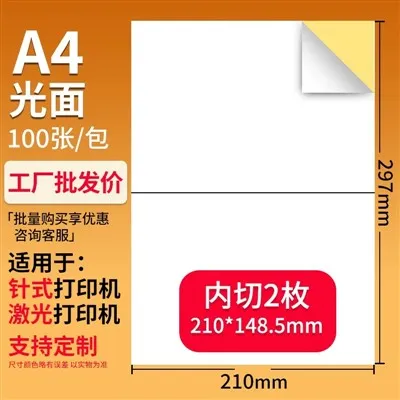
First, let’s talk about why not all self-adhesive labels are made for books. That cheap, glossy sticker you bought for mailers? It’s not going to work for a book spine. Book labeling has unique needs: it needs to withstand repeated handling, hold up against dust and occasional spills, and not fade when books sit in sunlight for years, plus it has to stick to a variety of surfaces—from smooth library bindings to textured paperback spines to matte hardcover covers. As a supplier, I’ve tested dozens of label types over the years, and the most reliable options fall into three main categories, depending on your use case. For home libraries or small office reference collections, matte paper labels are the sweet spot: they’re affordable, print crisply with both inkjet and laser printers, and have a strong acrylic adhesive that grips smooth or slightly textured spines without leaving residue when you remove them later (perfect if you’re re-shelving books or updating categories). For high-traffic spaces like school libraries or public reading rooms, go for synthetic polypropylene labels. These are water-resistant, tear-proof, and fade-resistant, even after years of exposure to overhead lighting. The only catch? They work best with laser printers, since polypropylene’s smooth surface can smudge inkjet pigment if it doesn’t have time to cure. And if you need labels for the inside of a book jacket or custom endpapers (think for gifted editions or special collections), white vinyl labels with a permanent, acid-free adhesive are the way to go—they won’t yellow over time like paper labels, and they won’t damage delicate book pages when applied correctly. The key here is matching your label to your environment; using a mailer label for a library book is a quick way to end up with half-peeled barcodes months later.
Once you’ve picked your labels, prep is the most critical step most people skip. I’ve watched customers yank a roll of labels, peel one off, and slap it on a dusty spine—only to have it bubble up or fall off three months later. Here’s what you actually need to do before applying anything: first, clean the book surface. Spines collect dust, oil from hands, and even tiny bits of debris from shelf paint over time, all of which create a barrier between the adhesive and the book. For paperback spines and hardcover bindings, use a soft, dry microfiber cloth to wipe away loose dust, or a barely damp cloth with mild dish soap for stubborn smudges—just make sure the area is completely dry before moving on. For older, delicate books or leather-bound volumes, stick to a dry microfiber cloth to avoid damaging the surface. Next, measure your space. The biggest mistake people make is using a label that’s too small (hard to read) or too big (it wraps around the spine unevenly or gets stuck when sliding books next to each other). As a supplier, I always tell customers to aim for a label that covers ⅔ to ¾ of the spine’s width, and leaves at least a ¼-inch gap from the top and bottom of the spine. This keeps the label visible from across a shelf and prevents it from peeling when books are pulled out by their top edge. For example, if your book spine is 4 inches wide, a 3-inch label is ideal—plenty of space for text, but not so long that it hangs over the edges.
Now, the application part. This is where patience pays off. First, print your labels (if you’re doing it at home or in your office) with a high-contrast, easy-to-read font—Arial, Calibri, or Helvetica in 10-12 point size works perfectly, sans-serif fonts are easier to read from a distance than script or serif styles. Print a test sheet first on plain paper to check that text isn’t cut off, and that the label size aligns with your printer’s settings (many home printers have a “labels” setting that adjusts print tension to prevent misalignment). Once you have your labels printed, let them rest for 10 minutes before applying—paper labels need to acclimate to room temperature to expand slightly, which helps the adhesive bond better, and synthetic labels need time for ink to cure so it doesn’t smudge. When you’re ready to apply, peel the label off the backing slowly, pulling it away at a 180-degree angle (parallel to the label) to avoid stretching or wrinkling the sticker. Line it up carefully with the top and bottom of the spine, using your finger to hold one edge steady while you lower the rest of the label onto the surface. Start pressing from the center of the label and work your way out to the edges, using a soft, flat tool like a credit card, squeegee, or even the edge of a book to smooth out any air bubbles. Work slowly—if you get a bubble, peel the edge back and re-press it, don’t try to smooth it out once the label is fully stuck, that will just create a crease. For books with rounded spines (common on paperbacks), press the edges a little extra firmly at the curve, since that’s where labels are most likely to peel over time. If you’re labeling books that go on a shared shelf (like in a classroom or community library), use a consistent placement rule—all labels go on the top third of the spine, or all aligned ½-inch from the top—so anyone can find a book without squinting.
Even with perfect application, some common issues pop up, so let’s go over troubleshooting the mistakes I see most often. First, peeling edges: this almost always means the surface wasn’t cleaned properly, or you used a label with the wrong adhesive. For instance, if you’re labeling books that get moved around a lot, a permanent adhesive is better than a removable one—removable adhesive is made to come off easily, so it’s not designed for repeated handling. If you already have peeling edges, you can gently lift the edge, wipe the area under it with a dry cloth, and reapply a small dot of archival adhesive (I recommend a PVA-based adhesive, available at office supply stores, for this) under the edge before pressing back down. Second, smudged text: this is almost always from printing on polypropylene labels with an inkjet printer, or pressing the label before the ink is dry. To fix this, let inkjet labels cure for 24 hours before applying, or switch to laser-printed synthetic labels for high-traffic spaces. Third, residue left when removing labels: this happens when you use a low-quality adhesive or leave the label on for too long (decades, for old library books). To remove the residue, gently rub the area with a cloth dampened with rubbing alcohol (test it on a small, hidden spot first for delicate books), and wipe away the sticky film. For very old books, a dry rubber eraser works well for light residue, as long as you’re gentle. And one quick pro tip I’ve picked up: if you’re labeling books for a library or rental program, add a small dot of clear packing tape over the finished label. It adds an extra layer of protection against spills and scratches, and it’s barely noticeable, unlike a full clear label over the whole spine.
Self-adhesive Printing Paper At the end of the day, labeling books is about organization that works for you. Whether you’re a home reader trying to sort your fantasy series from your cookbooks, a small business keeping track of client reference materials, or a school librarian managing hundreds of student books, the right self-adhesive label job makes finding what you need in seconds, instead of minutes. If you’re ready to stock up on high-quality, book-specific self-adhesive labels for your project, our team can help you pick the perfect type, size, and adhesive for your exact needs—no generic recommendations, just tailored advice from suppliers who’ve worked with book-related labeling for years. We can walk you through label sizing, suggest printer settings, and even offer bulk pricing for large projects. Reach out to our team to start a conversation about your book labeling needs today.
References
- Library Binding Institute. (2021). Best Practices for Library Book Labeling. American Library Association.
- Self-Adhesive Label Manufacturers Association. (2022). Surface Adhesion Guidelines for Book and Document Labeling. SAM News.
- National Association of School Libraries. (2020). Organizational Systems for K-12 Library Collections. School Library Journal.
- Paper and Film Label Testing Group. (2023). Abrasion and Fade Resistance Testing for Book Labels. Label Industry Global News.
Nanjing Green Label Printing Co., Ltd.
We are one of the most professional self-adhesive labels manufacturers and suppliers in China, also support customized service. We warmly welcome you to wholesale high quality self-adhesive labels at competitive price from our factory. For pricelist and quotation, contact us now.
Address: No. 116-3 Suyuan Avenue, Jiangning District, Nanjing
E-mail: greenlabel@126.com
WebSite: https://www.chinalabelprint.com/
